

Yes, Squarespace Can Rank on Google.
Let’s be real: Squarespace websites can absolutely rank well on Google.
At Northwest Brand Design, we’ve helped our clients improve Squarespace rankings with our guidance and Squarespace SEO tips.
Check out this stat from one of our clients. We compared our clients who partner with us for ongoing digital marketing (including blogging and full SEO strategy) with those who don’t actively use all of Squarespace’s built-in tools.
The difference?
130+ keywords ranking on the first page of Google
vs.
just 17.5 keywords on average without consistent SEO efforts!
That’s a 7x difference in visibility—purely from applying strategy, content, and structure to a beautiful Squarespace site. The tools are there. We just help you unlock them.
The myth that the platform is “bad for SEO” sticks around because many people assume that great design automatically equals great visibility. But design alone doesn’t get Google’s attention—strategy does. The truth is, Squarespace gives you everything you need to optimize your site without touching a line of code.
SEO is not automatic, but it’s totally doable for non-techies on Squarespace. With the right steps, your site can compete (and win) right alongside WordPress, Webflow, or any custom-built website.
This blog will walk you through the essentials so you can boost your Squarespace site’s visibility, attract more organic traffic, and finally get the search performance your brand deserves.
Why SEO Matters for Your Squarespace Site
If you’re building your business on Squarespace, SEO is one of the most powerful drivers of growth.
Organic search is often the #1 traffic driver for small businesses, which means the people most likely to become your customers are already searching for what you offer. They know what they want, so make sure you can show them you have what they need. SEO helps your audience find you, without relying on paid ads.
Squarespace gives you a major advantage here because it’s incredibly easy to update and edit content, and that’s a big SEO advantage. Since fresh, relevant, brand-aligned content is at the heart of SEO success, having a platform where you can make quick edits without technical headaches boosts your visibility.
But SEO isn’t only about traffic. It supports credibility, conversions, and long-term growth—on page one—creating a steady stream of discoverability that compounds over time.
The takeaway is, SEO sets your Squarespace site up for results that last.
Squarespace SEO Basics You Need to Know
Before you dive into advanced strategies, it’s important to understand the core SEO features Squarespace already gives you and how to use them strategically.
Responsive Design
One of the platform’s biggest advantages is its built-in mobile-responsive design. Every template is automatically optimized for phones and tablets, which is crucial since we’re all on our phones these days. You don’t have to wrestle device-specific settings. Squarespace handles that part for you.
URLs and SSL Certificates
Clean URLs and SSL certificates are also built in. Clean URLs help search engines understand your pages more easily, while SSL (“https”) signals that your site is secure. SSL is enabled by default, but it’s worth double-checking: go to Settings → Security & Privacy to confirm it’s active.
Meta Titles & Descriptions
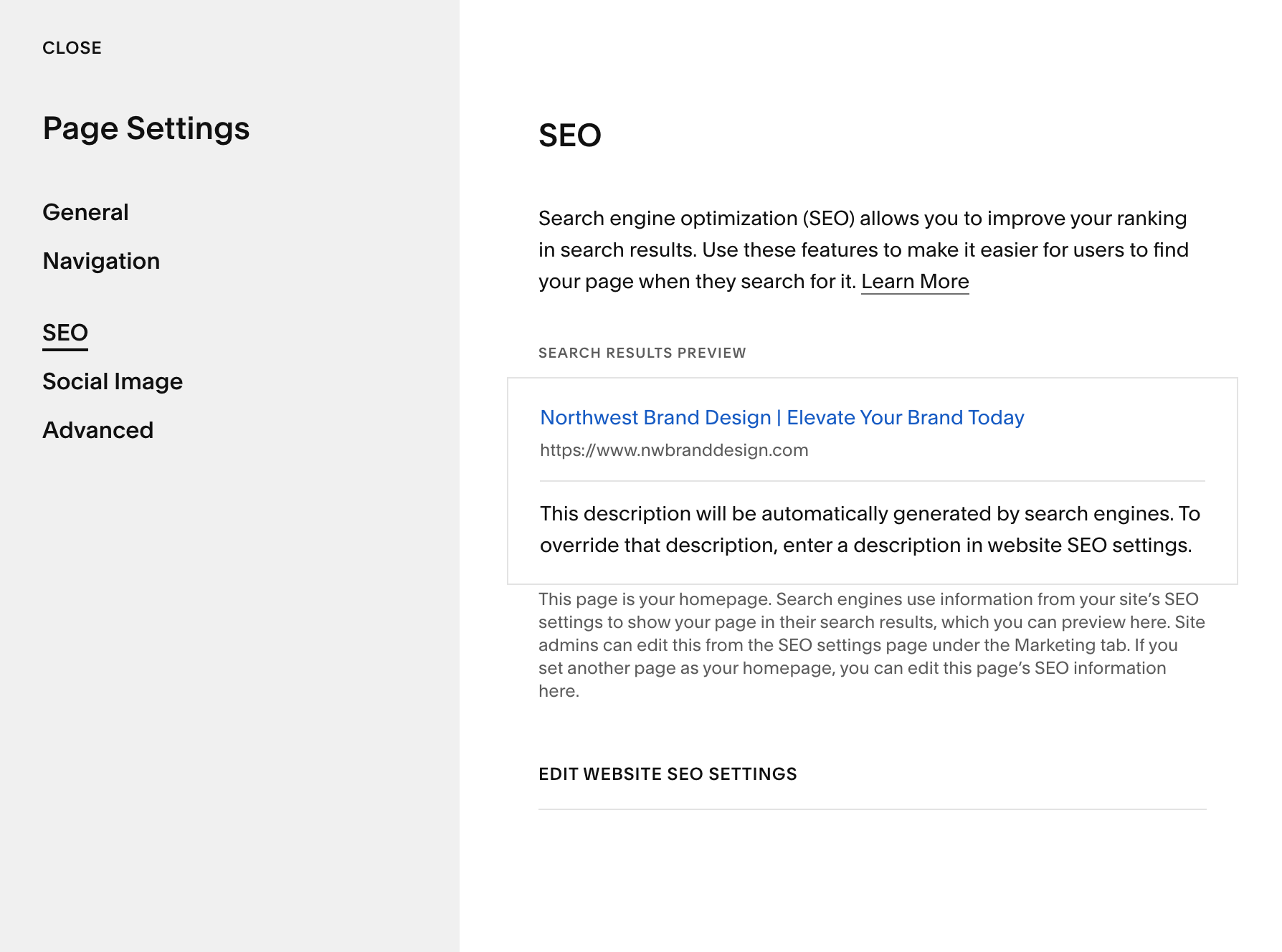
You’ll also want to review your meta titles and descriptions for each page. These are the previews that appear in Google’s search results, and Squarespace makes them easy to customize. In Page Settings → SEO (click on the gear icon next to your page title to access), you can update your SEO title, description, and URL slug. As always, avoid relying on the default text. It’s usually too generic and won’t tell search engines (or potential customers) what the page is really about.
Headings & Page Content
Finally, make use of page headers and structured content. Clear headings help both readers and Google understand your topic. By taking advantage of these built-in SEO basics and customizing them intentionally, you set a strong foundation for stronger visibility
On-Page SEO Tips for Squarespace
Once you’ve nailed the basics, on-page SEO is where your Squarespace site can really shine.
Keywords
Start with smart keyword use. Keywords help Google understand what your page is about, but they need to be placed intentionally—not stuffed into paragraphs unnaturally. Include your primary keyword in your page title, the H1 heading, at least one H2 header, and naturally throughout the body text. Think of keywords as signals, not scripts.
Headings
Heading structure is another simple but powerful ranking factor. Every page should have one H1, followed by H2s and H3s to organize sections. Don’t skip headings or use them purely for styling. Consistent structure helps both visitors and search engines scan your content.
Images & Alt Text
Images also matter for SEO. Before you upload a photo, rename the file with descriptive words. Once uploaded, include concise alt text explaining what the image shows. Not only does this support accessibility, but Google relies on image context when indexing your site.
Internal Linking
Internal linking is an underrated Squarespace advantage because it’s so easy to do. Linking between related pages not only guides users deeper into your site, but it also helps search engines understand how your content connects. Think blog posts linking to services, FAQs linking to contact pages, or portfolio items linking to case studies.
Finally, make sure to always customize your page titles and meta descriptions. Squarespace makes this simple in Page Settings → SEO. Clear, keyword-informed metadata boosts your click-through rate and helps Google deliver your content to the right audience.
Blog & Content Strategy for SEO on Squarespace
Blogging still matters (especially on Squarespace) because consistent, helpful content signals to Google that your site is active and, most importantly, worth ranking. A blog also gives you more opportunities to show up in search results for the questions your target audience is already asking.
Instead of relying only on your main pages, each post becomes its own doorway into your website.
To get the most SEO value, create keyword-rich posts your audience is searching for. Write content that’s genuinely useful and includes your target keywords in the title, headers, and naturally throughout the text.
As a reminder, our work with a client resulted in 130+ keywords ranking on the first page of Google vs. just 17.5 keywords on average without consistent SEO efforts!
Squarespace’s categories and tags help organize your blog and improve navigation, but they need to be used intentionally. Categories are your broad themes, while tags are more specific descriptors, so be sure to use categories and tags correctly.
Lastly (and importantly) always link your blog posts back to your service or product pages. When a reader finishes a helpful article, make it easy for them to take the next step. This internal linking boosts your SEO, improves user flow, and increases conversions—all from the content you’re already creating.
Technical & Advanced Settings
Once your content strategy and on-page SEO are in place, it’s time to set up the technical tools that help Google understand—and reward—your Squarespace site.
Start by connecting Google Search Console and Google Analytics. Squarespace makes this simple. In Settings → Developer Tools, you can verify your site with Search Console using the meta tag method. For Google Analytics, paste your Measurement ID into Settings → Analytics. These tools help you monitor visibility, track traffic, and understand how people actually use your site.
Squarespace automatically generates a sitemap for you, which is a major SEO advantage. All you need to do is submit that URL in Google Search Console so Google can index your pages more efficiently.
Next, check your redirects and 404 settings. If you’ve changed page URLs or moved content, set up 301 redirects in Settings → Advanced → URL Mappings to preserve your SEO value and prevent dead ends. Also customize your 404 page so users have a helpful path back into your site instead of hitting a hard stop.
Finally, use Squarespace’s built-in Analytics to keep improving. You can track search queries, top-performing pages, mobile usage, and referrers without leaving the platform. These insights help you strategically refine your content, identify opportunities, and make smarter decisions as your SEO strategy evolves.
Common SEO Mistakes to Avoid on Squarespace
Even with Squarespace’s built-in SEO advantages, a few small missteps can negatively impact your site in a search.
Duplicating page titles or meta descriptions
One of the most common is using duplicate page titles or meta descriptions. When multiple pages share the same metadata, Google struggles to understand what each page is about and you lose opportunities to rank for more targeted keywords.
Skipping Image Optimization
Another easily fixable mistake is skipping image optimization. Uploading giant image files slows down your site, and missing alt text means Google has no context for what the image represents. So, make sure to add clear, descriptive alt text every time.
Navigation Mistakes
Many site owners also forget to update their URL slug after renaming or restructuring a page. If your navigation says “Brand Strategy,” but the URL hasn’t been updated to reflect this change, then you’re losing clarity and keyword value. Clean, intentional slugs improve both SEO and user experience.
Ignoring Local SEO
Finally, for location-based business, ignoring local SEO becomes a major missed opportunity. Make sure your city or service area appears naturally in your content, metadata, and Google Business Profile. Your local market needs to know you’re right around the corner.

How NBD Can Help: Strategic SEO + Design
At Northwest Brand Design, we don’t just make your site look good—we make it findable. Just how you want to find and connect with the right audience, your audience wants to find and connect with you.
That’s why our team wants to collaborate with you. Our team can audit, optimize, and grow your site’s reach—not only making you visible, but ensuring you rank high in Google search results.
And we’re no stranger to Squarespace. We work in Squarespace every week for mission-driven clients, improving their organic visibility with SEO fits into that platform. We even have a brand toolkit download with SEO best practices and keywords organized by industry. Check it out!